
Every sales team starts with a spreadsheet. It’s free (or close to it), everyone already knows how to use it, and for the first few deals it does the job perfectly well. A row per prospect, a column for status, maybe one for the next follow-up date. Why add software to something that works?
The honest answer is: you shouldn’t, until it stops working. And here’s the thing about spreadsheets that makes this decision tricky: they don’t fail suddenly. They degrade slowly, in ways that are easy to rationalize, until one day you realize you’ve been spending more time maintaining the sheet than selling.
This article is about recognizing that point, not about pushing you toward a CRM before you need one.
Why spreadsheets work (at first)
Spreadsheets are genuinely good at a specific set of conditions: one person, or a very small team, tracking a small number of deals with a simple process. In that setting, they offer real advantages:
- Zero setup cost and zero learning curve. Nothing to configure, nothing to train anyone on.
- Total flexibility. Add a column whenever you need one, restructure whenever the process changes.
- Full visibility at a glance. With 30 rows, you can literally see your whole pipeline on one screen.
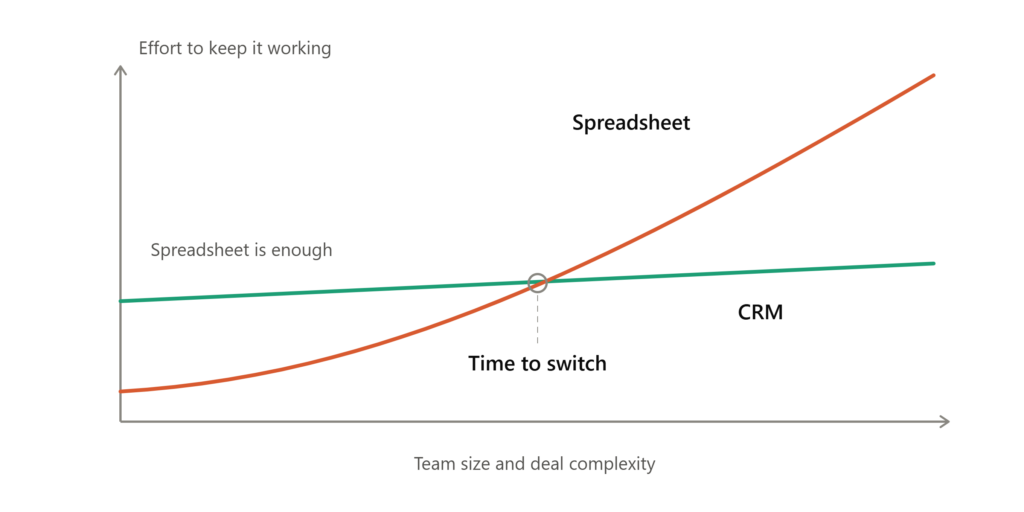
If that describes your situation today, a spreadsheet is a perfectly rational choice. The problems start when the conditions change but the tool doesn’t.
The four signs you’ve outgrown it
1. More than one person edits the sheet
The moment a second or third rep starts working in the same file, you inherit a set of problems spreadsheets were never designed to solve: overwritten changes, conflicting versions, no record of who changed what, and no way to see which rep touched a deal last. Shared cloud spreadsheets reduce the version-conflict issue, but they don’t solve the underlying one: there’s no concept of deal ownership, activity history, or accountability built into a grid of cells.
2. Your deals have more than a few moving parts
A simple one-call-close sale fits neatly into a row. A deal with multiple stakeholders, several stages, attached documents, a series of follow-up conversations, and different decision criteria for each contact does not. Teams in this situation typically start adding columns to compensate, then tabs, then a second spreadsheet to track the first. At that point, you’re not using a spreadsheet as a tool anymore. You’re maintaining a fragile, homemade database held together by habit.
3. You can’t answer basic reporting questions without manual work
Ask yourself how long it takes to answer these:
- How many deals are currently in each stage, and what’s their combined value?
- What’s our average time from first contact to close?
- Which deals haven’t been touched in the last two weeks?
- What’s our win rate by lead source?
If answering any of these requires building a pivot table, cleaning up inconsistent entries first, or “asking around,” that’s the clearest signal. A CRM exists largely to make these questions a two-click answer instead of a half-day project. If you’re spending real hours each month on reporting, the spreadsheet is already costing you more than the software would.
4. Follow-ups depend on someone remembering
A spreadsheet can store a “next follow-up date” column. It cannot remind anyone that the date has arrived. Every follow-up in a spreadsheet-based process relies on a person checking the sheet, noticing the date, and acting on it. As volume grows, that quietly turns into missed follow-ups, which, as covered earlier in this series, is one of the most expensive leaks in any pipeline.
What a CRM adds that a spreadsheet structurally can’t
It’s tempting to describe a CRM as “a spreadsheet with extra features,” but that undersells the real difference. A spreadsheet stores data. A CRM stores data and enforces behavior around it:
- Activity history attached to each contact automatically. Emails, calls, and notes accumulate on the record without anyone manually logging them in a cell.
- Automated reminders and tasks. The system tells the rep what to do next, rather than waiting for the rep to remember to check.
- Defined stages with rules. A deal can’t move forward unless required information is filled in, which turns your process into something the system actively supports.
- Permissions and ownership. Clear accountability for every deal, and the ability to control who sees or edits what.
- Reporting that updates itself. Dashboards built on live data, rather than a snapshot someone assembled last Tuesday.
- Integrations. Connection to email, calendar, marketing tools, and invoicing, so information doesn’t have to be copied between systems by hand.
None of these are impossible to approximate in a spreadsheet with enough effort. The point is that approximating them manually is exactly the kind of work that scales badly.
Count how many of these are true for your team today:
More than two people update the same pipeline file.
You track deals that involve more than one stakeholder.
Producing a pipeline report takes more than 30 minutes.
You’ve missed a follow-up in the last month because nobody noticed the date.
A fair counterpoint: don’t switch too early
It’s worth being honest about the opposite failure mode. Teams sometimes adopt a heavy CRM before they have a defined process, and end up with an expensive tool nobody uses properly. As covered in the first article of this series, a CRM can reinforce a process, but it can’t invent one for you.
A reasonable rule of thumb: if you can describe your sales process in a few sentences, and your team is small enough that everyone can see the full pipeline at a glance, stay with the spreadsheet a little longer. If you’re showing two or more of the four signs above, it’s time to move, and a lightweight CRM is usually a better first step than an enterprise platform.
A quick self-check
Count how many of these are true for your team today:
- More than two people update the same pipeline file.
- You track deals that involve more than one stakeholder.
- Producing a pipeline report takes more than 30 minutes.
- You’ve missed a follow-up in the last month because nobody noticed the date.
Zero or one: you’re probably fine for now. Two: start evaluating options. Three or four: you’re already paying the hidden cost, and switching is likely overdue.
Next in this series: choosing the right CRM by company size, starting with what startups and small teams actually need (and what they can safely ignore).