Most CRM projects don’t fail at go-live. They fail three months later. The system is configured, the data is migrated and the training is done. Then usage slowly drops, the spreadsheets come back and management starts to wonder what the investment actually delivered.
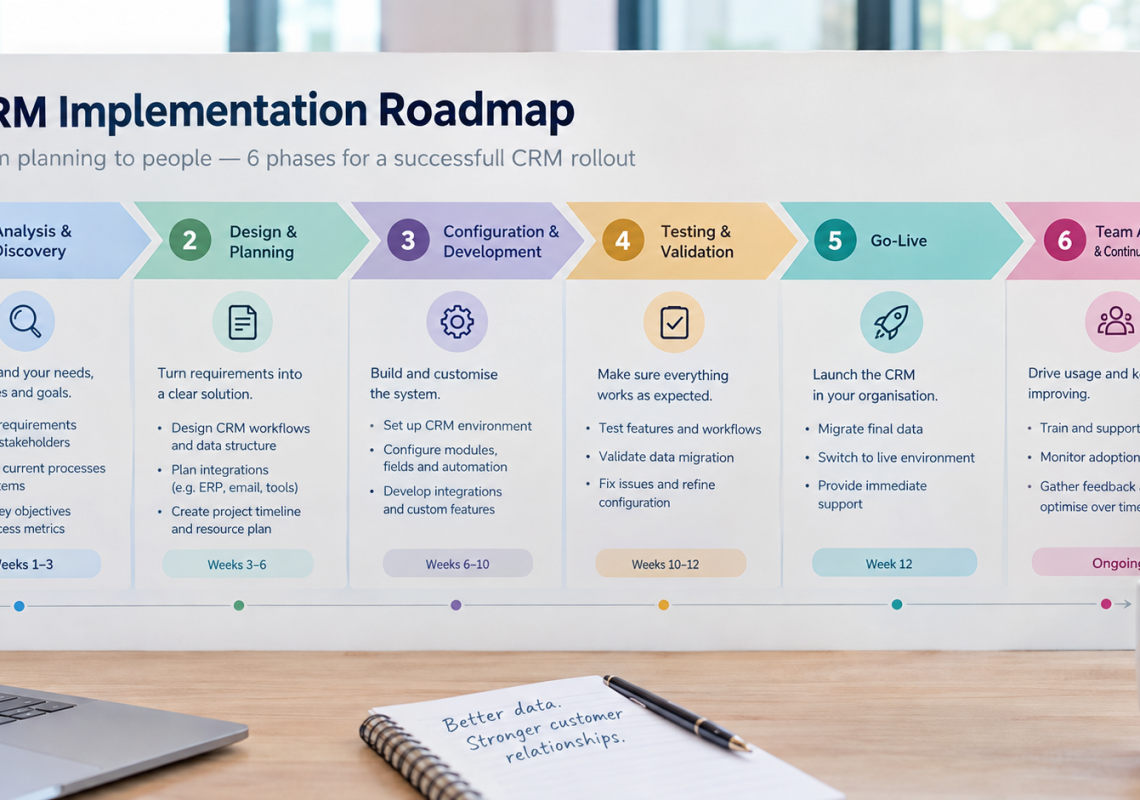
A successful CRM implementation is less about technology than about structure: a clear process, the right integrations, clean data and a plan for adoption that continues well after launch. This roadmap shows the six phases from kickoff to a CRM your team actually uses.
It’s the final part of our series, which covered the hidden costs of manual sales processes, sales process standardization, choosing a CRM, sales automation and scaling a sales team. Here, everything comes together.
In this article
- Why CRM projects stall after go-live
- The 6 phases of a CRM implementation
- Timeline and responsibilities at a glance
- How to choose a CRM implementation partner
- How genPsoft works
- FAQ
Why CRM projects stall after go-live
When CRM projects disappoint, the reasons are rarely technical. We see the same causes again and again:
- No defined sales process. The CRM is configured around today’s habits, including all their inconsistencies.
- Too much at once. Every wish from every department goes into the first version, which becomes complex and slow to use.
- Missing integrations. If prices, orders or emails still live in other systems, people keep working there.
- Poor data quality. Old duplicates and outdated contacts are migrated, and the new system starts with low trust.
- Adoption is treated as training. A two-hour session at launch, then the team is left on its own.
The roadmap below addresses each of these, phase by phase.
The 6 phases of a CRM implementation
Phase 1: Analysis and goals
Every successful implementation starts with understanding how sales really works today. In workshops with salespeople, management and adjacent teams, we map the current process, identify where time and deals are lost and agree on what the CRM should achieve.
Result: documented current process, prioritized requirements and measurable goals, for example faster lead response, a reliable weekly forecast or less manual data entry.
Phase 2: Design
Now the target picture is defined: pipeline stages and exit criteria, required fields, user roles and permissions, ownership rules, reports, the first automations and the integrations with other systems. If the sales process isn’t standardized yet, this is where it happens.
Result: a concept everyone has agreed on, including a clear scope for the first version. Everything else goes onto a roadmap for later phases.
Phase 3: Configuration and integration
The CRM is set up according to the design: stages, fields, views, permissions, templates and automations. In parallel, integrations are built and tested, for example with your ERP or SAP system, email and calendar, quoting tools or Microsoft Power Platform.
Integrations are usually the most demanding part of a B2B implementation, so they should be tackled early, not left until the end.
Result: a configured, integrated CRM, reviewed with key users in short iterations.
Phase 4: Data migration
Data from spreadsheets, the old CRM and other sources is cleaned and transferred. The most important decision is what not to migrate. Sort your data into three groups:
- Migrate: active customers, open deals and recent history
- Archive: old closed deals and inactive contacts you may still need for reference
- Delete: duplicates, test entries and personal data you’re no longer allowed to keep
Result: clean, deduplicated data in the new system, verified by the people who know it best.
Phase 5: Pilot, training and go-live
Before everyone switches, a pilot group works with the CRM in daily business. Their feedback is used to fix issues and simplify where needed. Training then focuses on real tasks, not on features: logging a call, updating a deal, creating a quote, finding a customer’s history.
Result: a tested system, trained users and a clear cut-over date after which the old spreadsheets are no longer used.
Phase 6: Adoption and continuous improvement
The first 90 days after go-live decide whether the CRM becomes part of daily work. During this phase:
- Management uses CRM reports in every pipeline meeting, not spreadsheets
- Key users answer questions and collect feedback
- Usage and data quality are monitored and discussed openly
- Quick improvements are made based on what the team actually needs
- The next automations and integrations from the roadmap are prioritized
Result: a CRM that the team relies on, and a plan for its further development.
Timeline and responsibilities at a glance
Durations depend on team size, the number of integrations and data quality. The ranges below are typical for small and mid-sized B2B companies.
| Phase | Typical duration | Key deliverable | Your role |
|---|---|---|---|
| 1. Analysis and goals | 1–2 weeks | Process map, requirements, goals | Join workshops, share current data and pain points |
| 2. Design | 1–2 weeks | Agreed concept and scope | Make decisions on stages, roles and priorities |
| 3. Configuration and integration | 3–8 weeks | Configured, integrated CRM | Review iterations, provide system access |
| 4. Data migration | 1–3 weeks (in parallel) | Clean data in the new system | Decide what to migrate, verify results |
| 5. Pilot, training, go-live | 2–4 weeks | Tested system, trained team | Provide pilot users, set the cut-over date |
| 6. Adoption | First 90 days | A CRM the team relies on | Lead by example, use CRM reports in meetings |
On your side, one person should act as product owner throughout the project: someone who knows the sales process, can make decisions and has time for the project every week.
How to choose a CRM implementation partner
The right partner matters as much as the right software. Use these questions to compare:
- Do they start with your process, or with a product demo?
- Do they have experience integrating CRMs with ERP systems such as SAP?
- Can they build custom extensions when the standard isn’t enough?
- How do they handle data migration and data protection?
- What does their support look like after go-live?
- Can they show comparable projects and references?
How genPsoft works
genPsoft is a software company based in Munich. We help B2B companies standardize their sales processes, implement CRM systems and automate the work between their systems. Three things shape how we work:
- Process first, vendor-neutral. We recommend the CRM that fits your process, not a particular product.
- Integration expertise. We connect CRMs with ERP and SAP systems, Microsoft Power Platform and the other tools you already use.
- Custom development when needed. When the standard reaches its limits, we build the extensions and integrations that close the gap.
Get the CRM Implementation Roadmap
All six phases, deliverables and responsibilities on one page. Use it to plan your project internally or to brief potential partners.
FAQ
How long does a CRM implementation take?
For small and mid-sized B2B companies, a first version is often live within two to four months. The main factors are the number of integrations, the quality of existing data and how quickly decisions are made. Adoption and further development continue after go-live.
What are the steps of a CRM implementation?
A typical CRM implementation has six phases: analysis and goals, design, configuration and integration, data migration, pilot and go-live, and adoption with continuous improvement.
Why do CRM implementations fail?
Most fail because of low adoption rather than technology. Common causes are an undefined sales process, too much scope in the first version, missing integrations, poor data quality and too little support after go-live.
Can a CRM be integrated with SAP?
Yes. Most common CRMs can be connected to SAP and other ERP systems, either through standard connectors, integration platforms or custom interfaces. The right approach depends on your SAP version, the data involved and how often it needs to sync.
Ready to plan your CRM implementation?
In a free 30-minute analysis call, we look at your current sales process, systems and goals, and outline what a realistic implementation would look like for your company.